How to sign-up for June's Journey newsletter
Our very own newsletter helps you stay connected with Orchid Island wherever you go. Sent straight to your email inbox, you’ll get the latest news on special contests, events, game updates, and free gifts including Coins, decorations, and more!
From time to time, you will get a pop-up in your June’s Journey game, giving you a chance to sign up for our newsletter.
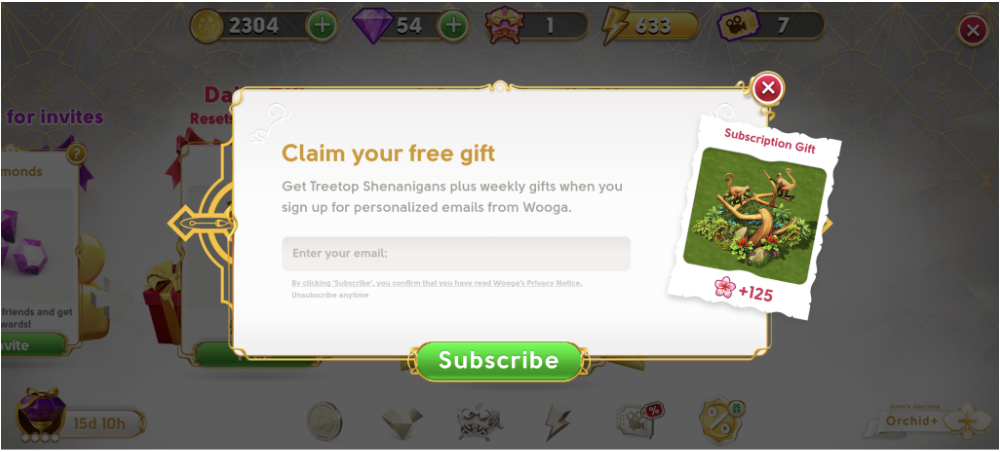
All you have to do is type your email in the text box and press "Subscribe".
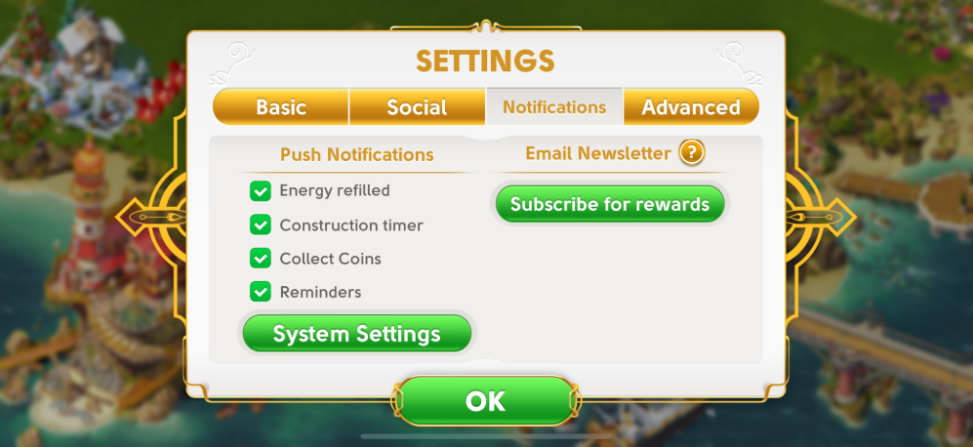
You can also sign up anytime using the Settings Menu in your game.
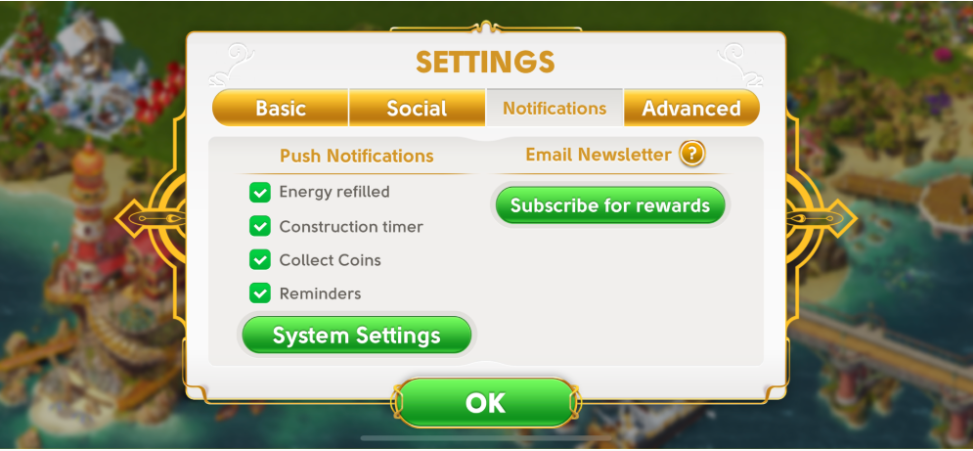
Open the game menu:
Tap Settings
Choose Notifications tab
Tap the (green) button “Subscribe for Rewards”
In-Game Offers Section (if not yet subscribed)
Look for a special offer card promoting newsletter signup rewards
Tap the ‘Subscribe’ on the card to open the signup pop-up
Once you successfully subscribe, the offer card will disappear.
Tip: Be sure to double check that you’ve typed your email correctly.
As soon as you press Subscribe to open the popup, and enter your email address and confirm “Subscribe”, an automated confirmation request will be sent to the email address you have entered. You are not subscribed to our newsletter until you open this email and click on the green button marked “Yes, I confirm!”
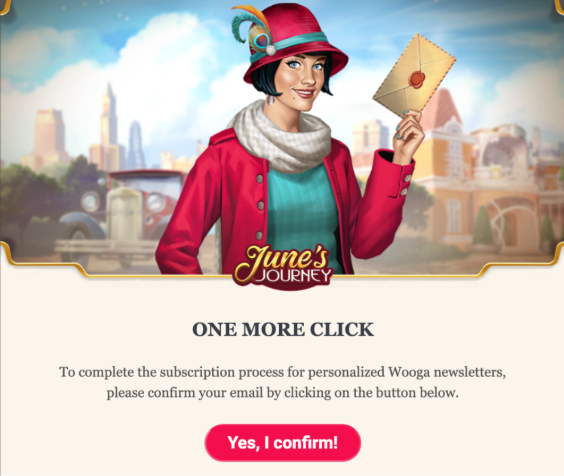
This step is necessary to ensure that your email address is valid, and that you truly wish to subscribe to our newsletter. This is also to protect your personal information as our player.
After clicking this button, a page will load that confirms the process was successful.
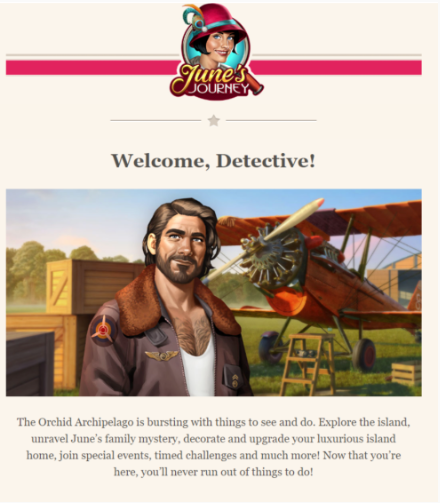
Once you have correctly completed the process up to this point, the only thing remaining is to receive our welcome email. This email serves as your first introduction to our June’s Journey newsletter. Luckily for you, you will receive a special gift by completing the sign-up process!
Note: You can only subscribe to our newsletter once. If your email address is already subscribed and you go through the process again, you will not receive the gift a second time.
If you subscribe to our newsletter with two different email addresses, you will receive the newsletter in both of your email inboxes, but the gifts can only be received in the game once.
If you are having trouble redeeming your reward, please see our guide on how to redeem gift links.
How to Check Your Subscription Status
You can view your current newsletter status directly in your game:
Open the game menu:
Tap Settings
Choose Notifications tab
Check the status under “Email Newsletter”
If the button is active (green) saying “Subscribe for Rewards”, you can subscribe.
If the newsletter button is greyed out saying “Subscribed”, this means you are already subscribed with an email address.
Why did my Popup close without signing up?
If you click “Subscribe” and open the signup pop-up but close it without writing your email and subscribing:
The game temporarily disables the button (button is greyed out)
You won’t be able to reopen it immediately
To try again, simply:
Close and restart the game
This helps prevent accidental multiple taps and duplicate signups.
How do I change my email for newsletter subscriptions?
If you want to use a different email, you’ll need to unsubscribe first.
Open any June’s Journey newsletter email you received
Click the Unsubscribe link at the bottom
Restart the game
Open Settings and subscribe again with your new email
This resets your subscription and reactivates the signup button in-game.
What can I do if I did not receive the June’s Journey newsletter?
Confirmation email for new subscribers
To receive our newsletters, you first need to subscribe. Please find the instructions here.
If you have just subscribed and have not received the confirmation email after 10 minutes, please follow the steps below:
Make sure you check your mailbox folders like spam, advertisements, promotions, and others. Automated emails from new senders are often placed there
Try searching for newsletter@junesjourney.wooga.com in the search bar of your email service provider
If, after attempting each of these steps, you still have not received the confirmation email, please contact us using this link, and our team will investigate this issue further for you.
General solutions
If you successfully subscribed and still do not receive our newsletters, here is a list of potential solutions:
Make sure you check all mailbox folders like spam, advertisements, promotions, and others
Search for newsletter@junesjourney.wooga.com in your mailbox
If you still cannot find it, it is possible that your email provider is blocking it. In this case, please try whitelisting our email address
Please review your list of blocked contacts, your settings, and your folder of deleted messages. Some emails are occasionally marked as deleted messages
One common reason for not receiving emails is full storage of the email inbox. If your inbox storage is full, you can delete some old messages or get more storage
If you followed these instructions and still do not receive our emails, please contact us here.
If you are having trouble redeeming your reward, please see our guide on how to redeem gift links.
How do I stop receiving your marketing emails?
Simply click the unsubscribe link found at the bottom of any marketing email you receive from us and follow the instructions.
For more information please refer to our Privacy Notice at https://www.wooga.com/legal/en/privacy-notice.