June's Journey on Facebook - Your Questions Answered
1. When is Facebook shutting down Web Games, and why?
Meta has officially announced changes to Facebook Web Games (formerly Canvas Games). As part of this, the classic way of playing June's Journey directly inside Facebook.com is retiring at the end of 2026. Going forward, we recommend playing on play.junesjourney.com, where you'll get the smoothest experience and exclusive Orchid+ benefits.
2. Is Facebook itself shutting down? And what about the mobile app?
No, Facebook is not shutting down, and neither is June's Journey on Facebook! Meta is changing how Web Games work on Facebook.com, so we're moving you to a better home for the game. Our mobile apps are completely unaffected — if you play on your phone or tablet, nothing changes there.
3. What does that mean for my game?
It means the way you access the game from Facebook.com is changing. Nothing is lost — your progress is 100% safe on our Wooga servers.
We recommend switching to play.junesjourney.com: just log in with your current Facebook account and continue right where you left off.
4. Do I need to wait until September 30th?
Not at all - and we actually encourage you not to wait! You can start playing on play.junesjourney.com today. Simply open the game, log in with your Facebook account, and continue your investigation right where you left off. The sooner you make the switch, the sooner you get to enjoy all the free Orchid+ benefits too!
5. Help! I logged in with Google and my game restarted from Level 1. How do I get my island back?
Don't panic, your original island is perfectly safe! This happens when the game accidentally creates a brand-new profile via Google instead of loading your existing one.
To recover your true progress and get back to your original game, just follow these quick steps:
Open the game and tap the Settings (gear icon) on your screen.
Select the Social tab.
Click or tap on Edit Connections.
Choose to connect with your Facebook account and log in.
The Most Important Step: The game will ask you which save file you want to load. Make sure to select your Facebook game - the one showing your high level and all your hard-earned coins!
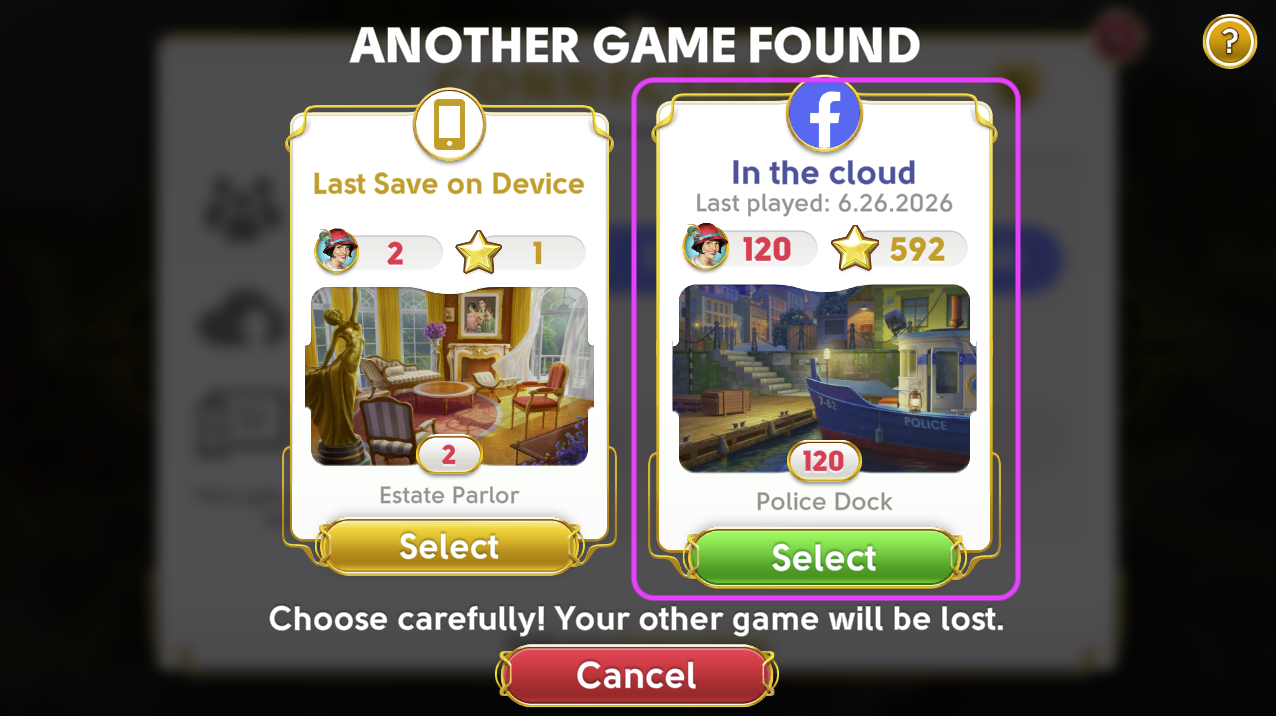
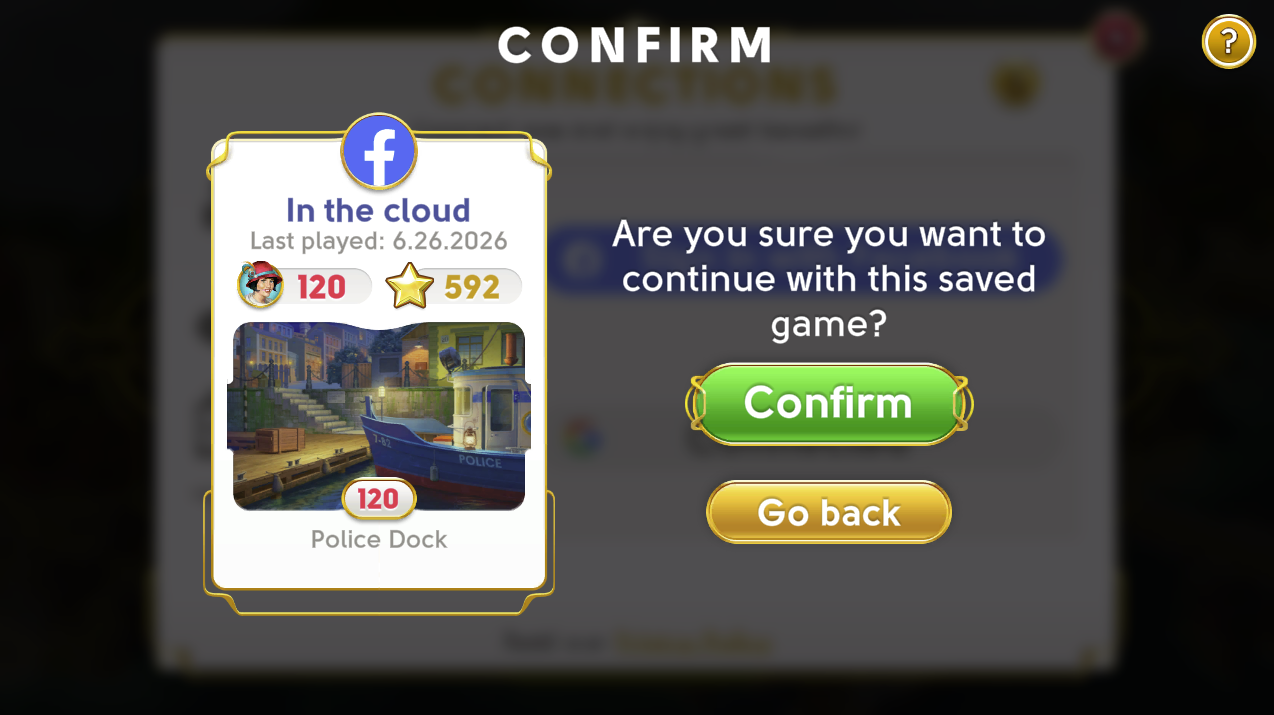
Tip: To avoid creating accidental duplicate accounts in the future, always make sure to select "Log in with Facebook" whenever you sign in on play.junesjourney.com!
6. How to play on play.junesjourney.com?
Type play.junesjourney.com on your browser
Login with your existing facebook account
Continue your investigations with the additional, exclusive benefits of Orchid+
Can't find it easily? You can also get there via the official Facebook Page:
Click "Play Game"
Bookmark the page for easier access next time!
How to bookmark it:
Google Chrome: Click the Three Dots (top-right) → More Tools → Create Shortcut. Check "Open as window" and click Create.
Microsoft Edge: Click the Three Dots → Apps → Install this site as an app.
Safari (Mac): Click the Share button in the toolbar → Add to Dock.
7. What about my friends and my club?
Your friends and club are safe! Because we use Facebook's login system, your friends list and profile picture carry over automatically - no extra steps needed on your end.
Your club and all its members will still be there. If your clubmates were also playing on Facebook, they'll simply need to make the same move to play.junesjourney.com. Once they log in with their Facebook account, everyone will be right back together. We recommend letting your club know about the move so no one gets left behind!
8. Is play.junesjourney.com different from my Facebook game?
No. It's the exact same June's Journey game you know and love, built by Wooga - just in a new home! Your game progress, island, and full investigation history transfer seamlessly when you log in with your Facebook account.
It works on all major browsers - Chrome, Edge, Firefox, and Safari - so you can keep playing comfortably on your usual computer.
9. What are the free Orchid+ benefits on play.junesjourney.com?
Think of this as your Detective Upgrade! These exclusive welcome gifts, offers and features are completely free for everyone playing on play.junesjourney.com - no subscription, no trial period, no catch. They're simply part of playing on the new platform.
🎁 Welcome Gift*: A special token of appreciation waiting for you the moment you arrive.
📈 Up to +50% on Daily Gifts: Get up to 50% extra value on your daily gift claims every single day.
✨ Quality of Life Features: Exclusive gameplay features to make your playing experience easier.
💎 Extra Value on Purchases: Get more diamonds and coins for your money.
🎟 Free Skip Pass*: Skip ads times and move through your detective tasks smoother than ever.
🛍 Exclusive Orchid+ Sales: Access unique deals and packages found nowhere else.
...and much, much more!
*Welcome Gift and Free Skip Pass offers are only valid for first-time Orchid+ players and are redeemable only once.
10. What about payments? I used to pay through Facebook.
play.junesjourney.com has its own secure, built-in payment system - and it actually gives you more options than before! You can pay using credit and debit cards, PayPal, and a range of other popular payment methods. The checkout process is safe, straightforward, and handled directly by Wooga and its chosen processors.
11. Does that mean the June's Journey Facebook Community Page is also shutting down?
Not at all! Our official Facebook Page at facebook.com/junesjourney is staying right where it is. You can still visit to join community contests, claim gifts and rewards, and chat with your fellow Detectives. Only the interactive game inside Facebook is retiring.
12. Is it secure to log into play.junesjourney.com?
Yes, completely. When you click "Log in with Facebook," you are authenticating through Meta's own official, secure login system. Wooga never sees, handles, or stores your Facebook password. Your account and your progress are in safe hands - all that's waiting for you is your next investigation.