Sign in with Facebook
Connecting your June's Journey game to Facebook is a great way to save your progress, and it ensures you can pick up where you left off if you switch devices or lose access to your current one.
What are the benefits of connecting to Facebook?
Seamless syncing: Play across multiple devices (phone, tablet, and desktop browser) and pick up right where you left off.
Easy restoration: If you get a new device, you can easily restore your progress by logging into your Facebook account.
Play with friends: Connect with Facebook friends, compare scores, and visit their islands to leave gifts.
How do I connect my game to Facebook?
Connecting is easy! Just follow these steps:
Open June's Journey on your device and go to Setting by tapping the cog icon at the upper right of the main island screen.
Tap on the Social tab.
Tap Edit Connections.
Choose "Sign in with Facebook" to connect and save your progress.
Allow your device to sync your progress fully before closing the game.
What does it mean to "Choose Your Game Save"?
When you sign in, the game may detect two different game states. You will be asked to choose which ONE you want to keep. In most cases, you should select the save with the highest level and most recent "last played" date, since that save contains your furthest progress.
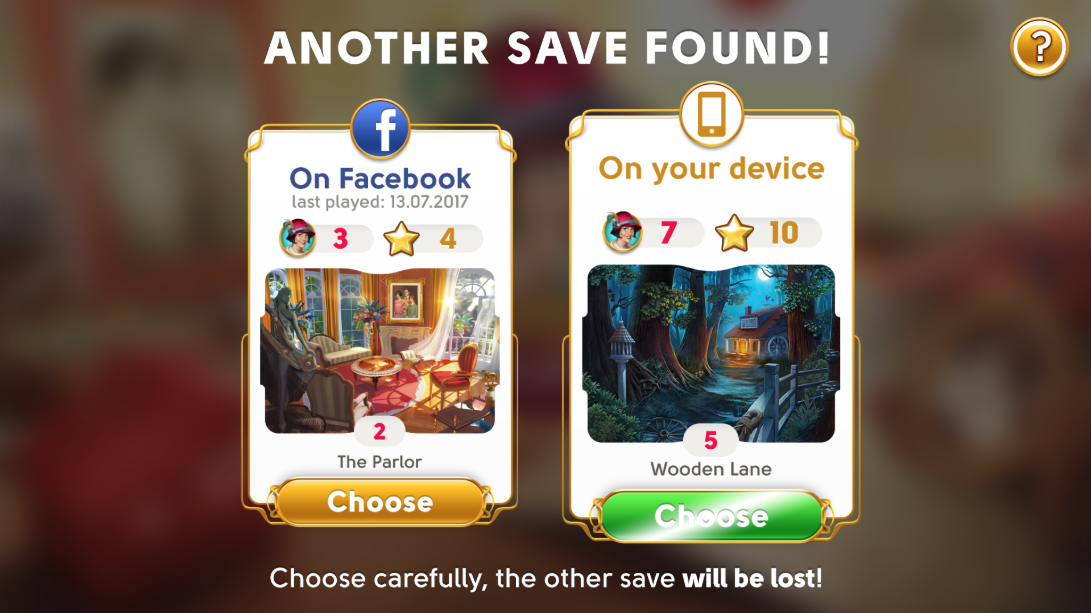
IMPORTANT: Once you choose a save, the other one is deleted and cannot be retrieved. Additionally, if you ever decide to un-sync your mobile version of the game from Facebook, you will have to start the game again from the beginning (level 1), as if you'd never played before.
For example, if you've played June's Journey on your mobile device and a computer via Facebook before, you will now be choosing to continue with only ONE of those games. The other one will be deleted and cannot be retrieved once you sync your game.
Can I have more than one game connected to Facebook?
No. You can connect only one game save to your Facebook account. To avoid data loss, we recommend playing only one game save per device.
Can I use other sign-in methods?
Yes! If you prefer not to use Facebook, you can also save your progress using:
Sign in with Apple (on iOS 13 or later)
Sign in with Google (on Android)
Please note that while Facebook allows for cross-platform syncing (e.g., Android to iOS), Apple and Google IDs only sync between devices of the same operating system. You are welcome to connect both a Facebook account and a platform-specific ID (Apple or Google) to the same game save, for extra security.
What if I have multiple games on different devices?
If you have two separate games on two different devices, you can keep both only if you keep them on separate devices and do not connect them to the same Facebook account. If you try to connect both to one Facebook account, one game will override the other, and the second game will be permanently lost.
Keep in mind that you cannot have more than one account per platform or social network at any given time. For more information, please visit: https://www.wooga.com/legal/en/terms-of-service.