Recover a Lost Account
If you have recently changed your device, or had to delete and reinstall June's Journey, you might find yourself unable to access your game account.
Please rest assured that in most cases, we can help you recover your island.
To make this process smoother, we always recommend connecting your game to one of our available cloud services. Doing so allows you to restore your account instantly without needing to contact support.
Depending on your device, you can connect your game using:
Facebook (Recommended for cross-platform play)
Apple ID (For iOS devices)
Google ID (For Android devices)
More info here
If your game was already connected to a service, please follow these steps to restore it:
Launch June's Journey on your device.
Connect using the same account you used previously.
Your game will prompt you to choose your Local or Cloud save
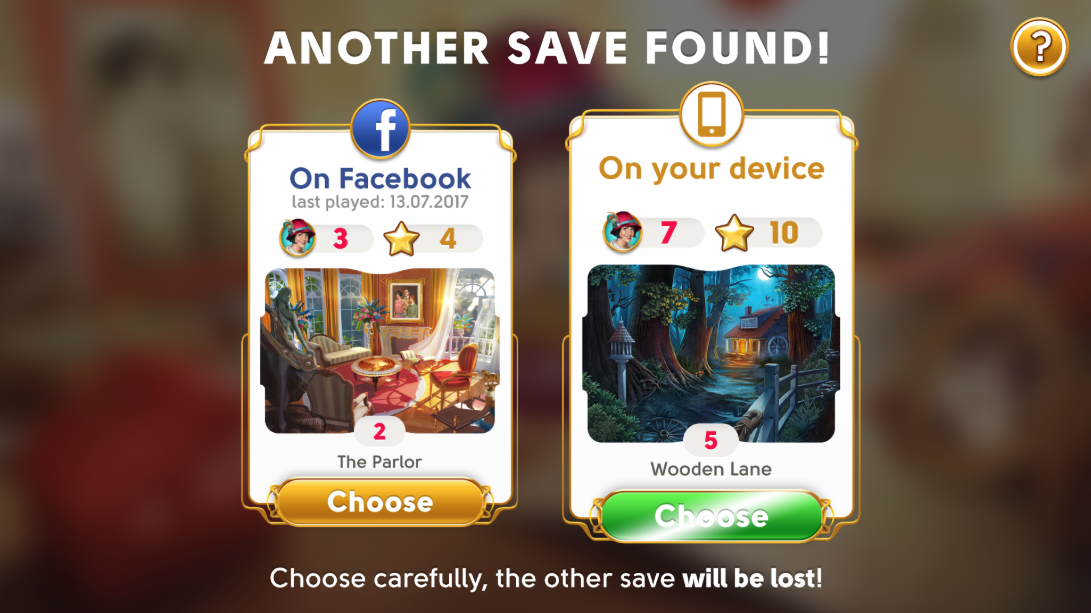
If your account was not linked to any social network or Cloud ID,
Please fill out the form below and submit your details. Our support team will gladly look into this and help you get back to your game!
Please Submit Your Lost Account Query Here
Kindly provide us with the following details so we can assist you recovering your progress.
The user ID of the newly created account.
The user ID of your original account.
The display name of your original account.
[Optional] If you were part of a Club, please add its name.
The level of your original account. Doesn't have to be precise.
The creation date of your original account. Doesn't have to be precise.
The Diamonds and Coins balance on your original account. Doesn't have to be precise.
[Optional] If you have a receipt for any transaction made with your original account, kindly attach it here.